
Firmware Release Notes - Commercial Inverters
Latest Firmware Version: 4.24.519
Release Date: September 2026
This firmware release contains fixes to general issues related to SolarEdge Three Phase Commercial Inverters and Three Phase Commercial Inverters with Synergy Technology.
Inverter Firmware Versions
| Products | CPU | DSP1 | DSP2 | Additional |
|---|---|---|---|---|
| Three Phase Commercial Inverter with PNs SExxK-xxxxlxxxx | 4.24.519 | 1.20.24115 | 2.20.24018 | |
| Three Phase Inverter with Synergy Technology PNs SExxK-xxxxlxxxx | 4.24.519 | 1.20.24115 | 2.20.24018 | Synergy Manager: EFM 1.1.11 M0 0.4.11 |
Device Firmware Versions
| Product | CPU | Controller | Comment |
|---|---|---|---|
| SolarEdge Revenue Grade Meter | SE-MTR-3Y-400V-B | 0.2030 | |
| Schneider Meter | IEM3255 | 1.6.200 | Wye revenue only |
| Janitza | 604 | 5.029 |
New Features and Enhancements
This release contains minor bug fixes and general improvements for SolarEdge Three Phase Commercial Inverters and Three Phase Commercial Inverters with Synergy Technology.
Previous Firmware Releases
Firmware Version: 4.24.518
Release Date: June 2026
This firmware release contains fixes to general issues related to SolarEdge Three Phase Commercial Inverters and Three Phase Commercial Inverters with Synergy Technology.
Inverter Firmware Versions
| Products | CPU | DSP1 | DSP2 | Additional |
|---|---|---|---|---|
| Three Phase Commercial Inverter with PNs SExxK-xxxxlxxxx | 4.24.518 | 1.20.24115 | 2.20.24016 | |
| Three Phase Inverter with Synergy Technology PNs SExxK-xxxxlxxxx | 4.24.518 | 1.20.24115 | 2.20.24016 | Synergy Manager: EFM 1.1.11 M0 0.4.11 |
Device Firmware Versions
| Product | CPU | Controller | Comment |
|---|---|---|---|
| SolarEdge Revenue Grade Meter | SE-MTR-3Y-400V-B | 0.2030 | |
| Schneider Meter | IEM3255 | 1.6.200 | Wye revenue only |
| Janitza | 604 | 5.029 |
New Features and Enhancements
This release contains minor bug fixes and general improvements for SolarEdge Three Phase Commercial Inverters and Three Phase Commercial Inverters with Synergy Technology.
Firmware Version: 4.24.511
Release Date: March 2026
This firmware release contains fixes to general issues related to SolarEdge Three Phase Commercial Inverters and Three Phase Commercial Inverters with Synergy Technology.
Inverter Firmware Versions
| Products | CPU | DSP1 | DSP2 | Additional |
|---|---|---|---|---|
| Three Phase Commercial Inverter with PNs SExxK-xxxxlxxxx | 4.24.511 | 1.20.24105 | 2.20.24016 | |
| Three Phase Inverter with Synergy Technology PNs SExxK-xxxxlxxxx | 4.24.511 | 1.20.24105 | 2.20.24016 | Synergy Manager: EFM 1.1.11 M0 0.4.11 |
Device Firmware Versions
| Product | CPU | Controller | Comment |
|---|---|---|---|
| SolarEdge Revenue Grade Meter | SE-MTR-3Y-400V-B | 0.2030 | |
| Schneider Meter | IEM3255 | 1.6.200 | Wye revenue only |
| Janitza | 604 | 5.029 |
New Features and Enhancements
This version resolves an issue where in some C&I systems, some of the Power Optimizer telemetries are not successfully transmitted.
Firmware Version: 4.24.510
Release Date: February 2026
This firmware release contains fixes to general issues related to SolarEdge Three Phase Commercial Inverters and Three Phase Commercial Inverters with Synergy Technology.
Inverter Firmware Versions
| Products | CPU | DSP1 | DSP2 | Additional |
|---|---|---|---|---|
| Three Phase Commercial Inverter with PNs SExxK-xxxxlxxxx | 4.24.510 | 1.20.24105 | 2.20.24016 | |
| Three Phase Inverter with Synergy Technology PNs SExxK-xxxxlxxxx | 4.24.510 | 1.20.24105 | 2.20.24016 | Synergy Manager: EFM 1.1.11 M0 0.4.11 |
Device Firmware Versions
| Product | CPU | Controller | Comment |
|---|---|---|---|
| SolarEdge Revenue Grade Meter | SE-MTR-3Y-400V-B | 0.2030 | |
| Schneider Meter | IEM3255 | 1.6.200 | Wye revenue only |
| Janitza | 604 | 5.029 |
New Features and Enhancements
| Feature | Description |
Region |
|---|---|---|
|
Support for ONE Controller for C&I – Firefighter Gateway Functionality
|
The ONE Controller for C&I now includes Firefighter Gateway (FFG) monitoring and management capabilities, providing PV installations with centralized safety control and rapid shutdown functionality. This ensures the safety of emergency responders during fires or other incidents. Its main features include:
Additional information about the SolarEdge ONE Controller FFG functionality can be found in this Application Note. Note: All Inverters on site must be running firmware 4.24.510 or newer to support the new ONE Controller for C&I - FFG functionality. |
Global (except NAM)
|
|
General Bugs and Issues
|
A number of bugs and other issues reported since the previous firmware release were resolved.
|
Global (except NAM) |
Known Issues and Limitations
SolarEdge ONE Controller's FFG functionality currently supports PV-only sites.
Firmware Version: 4.23.529
Release Date: October 2025
This release contains minor bug fixes and general improvements for SolarEdge Three Phase Commercial Inverters and Three Phase Commercial Inverters with Synergy Technology.
Inverter Firmware Versions
| Products | CPU | DSP1 | DSP2 | Additional |
|---|---|---|---|---|
Three Phase Commercial Inverter (with PNs SExxK-xxxxlxxxx) | 4.23.529 | 1.20.23120 | 2.20.23034 |
|
| Three Phase Inverter with Synergy Technology, up to 120kW (with PNs SExxK-xxxxlxxxx) | 4.23.529 | 1.20.23120 | 2.20.23034 | Synergy Manager: EFM 1.1.11 M0 0.4.11 |
Firmware Version: 4.23.524
Release Date: June 2025
This release contains minor bug fixes and general improvements for SolarEdge Three Phase Commercial Inverters and Three Phase Commercial Inverters with Synergy Technology.
Inverter Firmware Versions
| Products | CPU | DSP1 | DSP2 | Additional |
|---|---|---|---|---|
Three Phase Commercial Inverter (with PNs SExxK-xxxxlxxxx) | 4.23.524 | 1.20.23112 | 2.20.23034 |
|
| Three Phase Inverter with Synergy Technology, up to 120kW (with PNs SExxK-xxxxlxxxx) | 4.23.524 | 1.20.23112 | 2.20.23034 | Synergy Manager: EFM 1.1.11 M0 0.4.11 |
Firmware Version: 4.23.514
Release Date: March 2025
This release supports SolarEdge Three Phase Commercial Inverters and Three Phase Commercial Inverters with Synergy Technology.
Inverter Firmware Versions
| Products | CPU | DSP1 | DSP2 | Additional |
|---|---|---|---|---|
Three Phase Commercial Inverter (with PNs SExxK-xxxxlxxxx) | 4.23.514 | 1.20.23105 | 2.20.23030 |
|
| Three Phase Inverter with Synergy Technology, up to 120kW (with PNs SExxK-xxxxlxxxx) | 4.23.514 | 1.20.23105 | 2.20.23030 | Synergy Manager: EFM 1.1.11 M0 0.4.11 |
Devices' Firmware Versions
| Product | PN | Version | Comment |
|---|---|---|---|
SolarEdge Revenue Grade Meter | SE-MTR-3Y-400V-B | 0.2030 |
New Features and Enhancements
| Feature | Feature Description | Region |
|---|---|---|
String Detection
| With the new string detection feature, SolarEdge installers will benefit from:
Follow these steps to perform string detection: Note: Pairing Power Optimizers is now accessible via the SetApp Commissioning main menu > Optimizers.
1. In the Optimizers Pairing window, the user has the option to enter the number of Power Optimizers per inverter unit, to shorten the pairing validation time. Furthermore, if the Perform String Detection box is checked, string detection will automatically take place after the pairing process is complete. Tap Start Pairing to start the process.
2. The string detection process will commence once pairing has finished and can take up to a few minutes, depending on the number of strings and Power Optimizers). A summary screen is displayed after string detection is complete: 3. Tapping More below each unit column will display the detected strings and their connected Power Optimizers:
Note: If the String Detection process is interrupted at any stage by turning OFF the inverter or disconnecting the AC or DC supply, the DC cables will carry high voltage (up to 120V) until the process times out (up to 20 minutes). | All
|


Known Issues and Limitations
Central Commissioning feature
While Follower inverters are being upgraded, SetApp may indicate that the inverter cannot be upgraded. However, this may not actually be the case. Use the inverter’s LED indications to verify that the upgrade is in fact proceeding as normal, as referenced here: https://www.solaredge.com/leds
- Note: This issue occurs mainly on iOS devices
- Workaround: You may choose to wait until the Followers' firmware upgrade is complete before continuing with the Central Commissioning process. Otherwise, you can proceed as normal and if needed, repeat the process.
Firmware Version: 4.22.518
Release Date: December 2024
This release supports SetApp-enabled Three Phase Commercial Inverters and Three Phase Commercial Inverters with Synergy Technology.
Inverter Firmware
| Products | CPU | DSP1 | DSP2 | Additional |
|---|---|---|---|---|
| Three Phase Commercial Inverter (with PNs SExxK-xxxxlxxxx) | 4.22.518 | 1.20.2280 | 2.20.2218 | |
| Three Phase Inverter with Synergy Technology, up to 120kW (with PNs SExxK-xxxxlxxxx) | 4.22.518 | 1.20.2280 | 2.20.2218 | Synergy Manager: EFM 1.1.11 M0 0.4.11 |
Devices' Firmware Versions
| Product | PN | Version | Comment |
|---|---|---|---|
| SolarEdge Revenue Grade Meter | SE-MTR-3Y-400V-B | 0.2030 |
New Features and Enhancements
| Feature | Feature Description | Region |
|---|---|---|
Synergy Unit Pairing
| Save time onsite with the updated Synergy inverter commissioning process, now enabling successful pairing and production of individual Synergy units instead of the whole inverter. For example:
For example: 2. Select the unit you wish to re-pair and start pairing. 3. Pairing will then be completed on the selected unit only, without affecting other units | All
|
| Commissioning Report – new capabilities and improvements | Generating the Commissioning Report in SetApp gives you a comprehensive overview of all site inventory and relevant configurations. Once generated, the report can easily be shared in JPG (multiple files) or PDF formats in landscape orientation for easier review in the office. Commissioning Report Access, Generation & Export:
When using the Commissioning Wizard, tap the Generate Report button that appears in the Summary screen:
Note: The Commissioning Report generation is adaptive to the specific inverter configuration i.e. it only displays existing and configured information. For example: If the selected Reactive Power Mode is Q, only the Q value is displayed and all other reactive power configurations which are NOT used are not displayed.
New capabilities and improvements:
Known issues and limitations:
|
|
VDE 4110 – SE33.3K/SE66.6K/SE100K to support full power at 90% of Vgrid
| The VDE4110 standard requires that the PV inverter supply full power in the event of a grid voltage variance of 10%.
| Germany |
FRT Mode info added to SetApp
| By adding the following FRT Mode information to the SetApp FRT Mode screen, installers now have additional clarity regarding FRT Mode functionality for an improved user experience: | All |
Dynamic Reactive Setting at night
| To improve inverter grid support at night, reactive power production can now be dynamically adjusted via Modbus control.
|
|


Known Issues and Limitations
- Optimizers P_OK and status list is populated after performing a Factory Reset. After the Factory Reset, P_OK increases and the Power Optimizers status list in SetApp is also populated with the previously paired Power Optimizers.
- Workaround: After pairing is performed, the correct values will appear
Firmware Version: 4.21.511
Release Date: July 2024
The latest Internal Firmware Release Notes for v4.21.511 can be found below.
Inverter Firmware
| Products | CPU | DSP1 | DSP2 | Additional |
|---|---|---|---|---|
| Three Phase Commercial Inverter | 4.21.511 | 1.13.2306 | 2.19.1900 | |
| Three Phase Commercial Inverter (with PNs SExxK-xxxxlxxxx) | 4.21.511 | 1.20.2063 | 2.20.1621 | |
| Three Phase Inverter with Synergy Technology | 4.21.511 | 1.13.2306 | 2.19.1900 | |
| Three Phase Inverter with Synergy Technology, up to 120kW (with PNs SExxK-xxxxlxxxx) | 4.21.511 | 1.20.2063 | 2.20.1621 | Synergy Manager: EFM 1.1.11 M0 0.4.11 |
Devices' Firmware Versions
| Product | PN | Version | Comment |
|---|---|---|---|
| SolarEdge Revenue Grade Meter | SE-MTR-3Y-400V-B | 0.2020 |
New Features and Enhancements
| Feature | Feature Description | Region |
|---|---|---|
| Improvement in AFCI Mechanism | Inverters are now compliant with the new AFCI standard: IEC63027 | Global |
| Enable/Disable Sense Connect | Added the ability to enable or disable the Sense Connect feature for supported S-Series Power Optimizers. The default setting is ‘Enabled’. See example in the screens below:
| Global |
| Unlocking an Inverter After a Sense Connect Event | In SetApp, added the option to unlock an inverter which was locked following a Sense Connect event. If an event occurs, the Sense Connect status will switch to 'Inverter Lock' on the maintenance screen. To unlock the inverter and continue PV production, navigate to the Sense Connect screen, select 'Inverter Unlock', and confirm the procedure.
| Global |
| Displaying Power Optimizer SN that Caused Inverter Lock | The Power Optimizer serial number that triggered Sense Connect and locked the inverter was added to the status screen in SetApp, as shown in the ‘Inverter is Locked’ dialog box below:
| Global |
| Reactive Power at Night | All SolarEdge commercial inverters can now be configured to provide reactive power to the grid overnight when there is no active PV production, helping to maintain grid stability. To enable Reactive Power at night using SetApp:
For more information review the application note: https://knowledge-center.solaredge.com/sites/kc/files/se-set-volt-ampere-reactive-at-night.pdf |


Country Table Updates
- Northern Ireland
- Reduced disconnection times to 200ms
- Hungary
- Enabled Grid Protections on Hungary Grid Codes (84, 167)
- Modified Hungary Grid Codes (84, 167)
- Cyprus
- Created a new grid code: "CYPRUS P >= 10.4 kWp "
- Modified the "Cyprus" (017) grid code
Known Issues and Limitations
- Optimizers P_OK and status list is populated after performing a Factory Reset. After the Factory Reset, P_OK increases and the Power Optimizers status list in SetApp is also populated with the previously paired Power Optimizers
- Workaround: After pairing is performed, the correct values will appear
- Workaround: After pairing is performed, the correct values will appear
- IEEE 1547 register map 703 mismatch.
Max/Min wakeup grid voltage in SetApp is now correctly aligned to the Modbus register.
The Min. and Max Grid Voltage units were changed to p.u. in SetApp (which is now calculated as )Max. Grid Voltage / V nominal) * 100)
Firmware Version: 4.20.514
Release Date: April 2024
This release supports Three Phase Commercial Inverters and Three Phase Commercial Inverters with Synergy Technology.
Impacted Products and Software
| Products | CPU | DSP1 | DSP2 | Additional |
|---|---|---|---|---|
| SE25K-SE33.3K Three Phase Commercial Inverter | 4.20.514 | 1.13.2305 | 2.19.1900 | |
| SE20K-SE40K Three Phase Commercial Inverter with PNs SExxK-xxxxIxxxx | 4.20.514 | 1.20.1928 | 2.20.1514 | |
| SE50K-SE100K Three Phase Inverter with Synergy Technology | 4.20.514 | 1.13.2305 | 2.19.1900 | |
| SE50K-SE120K Three Phase Inverter with Synergy Technology (up to 120kW), with PNs SExxK-xxxxIxxxx | 4.20.514 | 1.20.1928 | 2.20.1514 | Synergy Manager: 0.4.11 / 1.1.10 |
Devices' Firmware Versions
| Product | CPU | Controller | Additional |
|---|---|---|---|
| SolarEdge Revenue Grade Meter SE-MTR-3Y-400V-B | 0.2020 | 2.19.1900 |
New Features and Enhancements
Reduced P_OK time for Power Optimizers - Global Release
Significantly reduced the detection (P_OK) time for Power Optimizers when performed during site commissioning. The detection process is now much quicker than before and finishes as soon as the expected number of Power Optimizers is successfully detected (taking only several minutes on average but not longer than 10 minutes).
To support this improvement, a new step was added to the SetApp Pairing process for installers to enter the expected number of Power Optimizers to be detected by each inverter. This helps installers validate that the process was successfully completed, and all units were connected while they’re still on-site, in case any issues arise.
Note: This upgrade is supported by all P and S-Series Power Optimizers out of the box.
* If the expected number of Power Optimizers is not entered, the detection process will finish after 10 minutes instead of only 3.
The revamped Power Optimizer detection flow is as follows:
To start the Power Optimizer Pairing and P_OK process, enter the 'Pairing' option via the SetApp main menu and tap ‘Start Pairing’.
From the new ‘Optimizers Number’ window, enter the number of expected Power Optimizers to be paired.
- For Three Phase Inverters:

- For Synergy Inverters, enter the number of Power Optimizers per Synergy unit (as shown in the example below for a 2-unit Synergy inverter

- Power Optimizer pairing is then performed as before, and after this stage is complete inverter production will begin:

- The Power Optimizer detection process is complete once the expected number of units has been reached:

If there is a mismatch between the expected and the actual detection of Power optimizers, there can be several potential results from the detection process:
- If the expected number of Power Optimizers is not entered (or was set to zero): the Power Optimizer count times out after 10 minutes (the maximum count time allowed).
- If the expected number of Power Optimizers entered is lower than the detected number: the installer will be notified that the pairing process was successfully completed once the expected number of Power Optimizers has been detected, and the Power Optimizer count will continue in the background until the actual detected number is reached.
- If the expected number of Power Optimizers entered is higher than the detected number: the search to find the total number of expected Power Optimizers continues. This search times out after 10 minutes. The installer can then:
Confirm that the detected number is the correct amount by tapping ‘It’s OK’ Or Tap ‘Re-pair’
Now Compatible for Commercial Installations: SolarEdge Home Hub Three Phase Inverters and SolarEdge Home Battery 48V - Europe Only
SolarEdge commercial sites can now be connected to the residential SolarEdge Home Hub Inverter - Three Phase and SolarEdge Home Battery 48V, enabling on-grid storage for the small-scale commercial market.
Read this App Note to learn more about configuring the SolarEdge Home Hub Solution for commercial site designs.
Country Table Updates
Germany: updated German grid code names:
| Existing Name | New Name |
|---|---|
| 003 - Germany | Germany 4105 |
| 038 - Germany MVGC | Germany 4110 |
| 089 - Germany MV 480V | Germany 4110 480V |
- Germany: Added P(f) underflow options for 4110 grid codes
- New Caledonia: New grid codes were updated to align with local regulations
- Slovakia - Update Slovakia parameters
Known Issues and Limitations
- IEEE 1547 register map 703 mismatch:
- Max/Min wakeup grid voltage in SetApp doesn't match the Modbus register (which displays the value in relation to V nominal)
- Workaround: To match the values, the following calculation must be performed:
- (Max. Grid Voltage / V nominal) * 100)
- Expected fix: 4.21.5xx
- Optimizers P_OK and status list is populated after performing a Factory Reset. After the Factory Reset, P_OK increases and the Power Optimizers status list in SetApp is also populated with the previously paired Power Optimizers
- Workaround: After pairing is performed, the correct values will appear
- Commercial Three Phase Inverters: when enabled, the inverter’s Active Export limit isn't updated to the SetApp status/site/limit field. However, the Active Export feature continues to function normally as configured
Firmware Version: 4.19.521
Release Date: November 2023
This release supports Three Phase Commercial Inverters and Three Phase Commercial Inverters with Synergy Technology.
Released Firmware Versions
| Product | CPU | DSP1 | DSP2 | Additional |
|---|---|---|---|---|
| Three Phase Commercial Inverter | 4.19.521 | 1.13.2212 | 2.19.1806 | |
| Three Phase Commercial Inverter with PNs SExxK-xxxxIxxxx | 4.19.521 | 1.20.1648 | 2.20.1307 | |
| Three Phase Inverter with Synergy Technology | 4.19.521 | 1.13.2212 | 2.19.1806 | |
| Three Phase Inverter with Synergy Technology (up to 120kW) with PNs SExxK-xxxxIxxxx | 4.19.521 | 1.20.1648 | 2.20.1307 | Synergy Manager: 0.4.9 / 1.1.9 |
New Features and Enhancements
- SolarEdge Sense Connect
- Sense Connect functionality is now supported on SolarEdge Three Phase 16K-17K inverters, protecting the PV Module (DC) side of the system. Power Optimizers continuously monitor the connector temperature on their short input and output cables and inform the inverter of any abnormal temperature increase so it can react accordingly.
- SetApp – Power Optimizer serial number is now displayed on Sense Connect alerts
- Potential Induced Degradation (PID)
- The ability to enable PID mitigation remotely is now supported for Three Phase Synergy Technology inverters via the Monitoring Platform. Go to the ‘Remote Settings’ menu in the Monitoring Platform’s ‘Admin’ tab to toggle the inverter’s PID Mitigation settings. Learn more here
- SetApp Interface Updates
- SetApp PID Activation menu: users can now differentiate between the built-in SolarEdge PID solution and an external third-party PID device
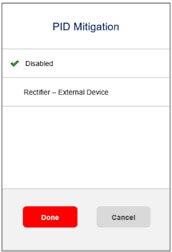
- Status SetApp page for Commercial inverters: added Sac, I1, I2, I3, V12, V23, V31 measurements as follows:
Previous Screen
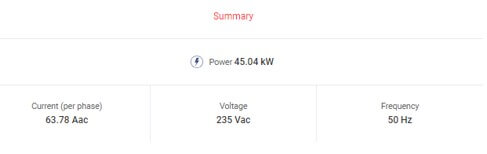
Updated Screen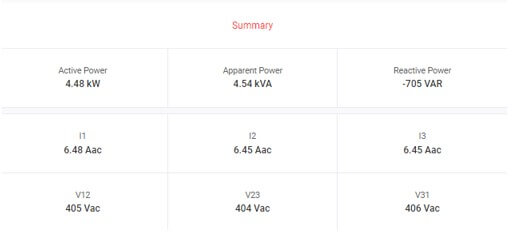
- SetApp Language Configuration
- Language configuration is now performed via “SetApp side menu > Settings > Locale”, instead of via the “Commissioning > Country and Language” menu
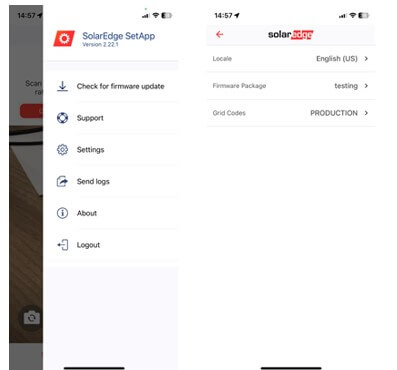
- Language configuration is now performed via “SetApp side menu > Settings > Locale”, instead of via the “Commissioning > Country and Language” menu
- SetApp PID Activation menu: users can now differentiate between the built-in SolarEdge PID solution and an external third-party PID device
- Zero-Export Limitation
- SolarEdge inverters are now compliant with UNE217001: 2020-10 and Spain ITC-BT-40 (RD 244/2019) zero export to grid regulations.
- For more information please read this application note
- SolarEdge inverters are now compliant with UNE217001: 2020-10 and Spain ITC-BT-40 (RD 244/2019) zero export to grid regulations.
Country Table Updates
| Country | Issue Description |
|---|---|
| Korea | Added new grid code for Korea (800Vdc). A SE33.3K inverter with DCD will require a fixed string voltage of |
| Australia | To avoid installer confusion, the name for ‘Old’ Australia grid codes was changed to ‘Obsolete’. |
| France | Existing country code was m odified to Cosphi = 1:
The following new grid codes for power configuration were created:
|
| Czech Republic | Added new Czech inverter settings in accordance with ‘CEZ Distribuce’ defined thresholds |
| Japan | Updated display names of grid codes for Japan:
|
| Slovenia | Country code updated to support type A certification |
Austria | R25 - Austria Country Table updated |
Austria | R25 - PT1 time constant tau for Q(U) and P(V) is now available for installer input in the Power Control menus |
Greece, Slovenia, Slovenia MV, France | Enabled Grid Protection settings |
Vietnam | Modified Vietnam grid code to support requirements of sites > 500kW |
Hungary | Updated parameters for Hungarian grid codes |
Brazil | Updated parameters for Brazilian grid codes according to the national grid operator (ONS) |
Norway | Updated Norwegian grid codes stage 1 frequency thresholds to:
|
Italy | Split Italy country settings into three new settings in order to help installers correctly set frequency and voltage thresholds:
|
Known Issues and Limitations
- Optimizers P_OK and status list is populated after performing a Factory Reset. P_OK increases and the Power Optimizers status list in SetApp is also populated with the previously paired Power Optimizers
- Workaround: After pairing is performed, the correct values will appear
- Commercial Three Phase Inverters: when enabled, the inverter’s Active Export limit isn't updated to the SetApp status/site/limit field. However, the Active Export feature continues to function normally as configured
- Central Settings (Leader, Follower): the Follower P(V) and Q(V) values are set to a different value than the Master.
- Workaround: Perform Central Commissioning to restore the correct values to the Follower inverter
Firmware Version: 4.19.513
Release Date: August 2023
This release supports the UK PV market only.
With the introduction on May 1, 2023 of the new G100 Issue 2 Amendment 2 for the customer limiting scheme, SolarEdge residential and commercial products including PV inverters, batteries, and Smart Energy devices now fully comply with this latest G100 amendment.
Released Firmware Versions
| Product | CPU | DSP1 | DSP2 | Synergy Manager |
|---|---|---|---|---|
| Three Phase Commercial Inverter | 4.19.513 | 1.20.1643 | 2.20.1305 | 0.3.8 / 1.1.9 |
| Three Phase Commercial Inverter with PNs SExxK-xxxxIxxxx | 4.19.513 | 1.13.2211 | 2.19.1806 | |
| Three Phase Inverter with Synergy Technology | 4.19.513 | 1.13.2211 | 2.19.1806 | |
| Three Phase Inverter with Synergy Technology (up to 120kW) with PNs SExxK-xxxxIxxxx | 4.19.513 | 1.20.1643 | 2.20.1305 |
New Features and Enhancements
G100 Introduction
EREC G100 Issue 2 supersedes EREC G100 Issue 1 Amendment 2 “Technical Requirements for Customers Export and Import Limitation Schemes” and became mandatory for sites commissioned after May 1, 2023. G100 Issue 2 requires control of the PV system such that the current flow levels at the grid connection point will remain within pre-configured boundaries. The current boundaries are set by the installers during the commissioning phase, according to the levels that were agreed upon in the Connection Agreement.
At the steady state, the inverter constantly monitors the current flow level at the grid connection point. It manages the production level and site consumption (by controlling the smart devices) to maintain the Import and Export values within the configured boundaries. G100 also defines a set of rules for entering the system into restricted operational modes in cases where the limitations were breached. If the system is operating in one of the restricted modes, installers will be able to set the system back to Normal mode.
G100 System Settings
System default current limits are as follows:
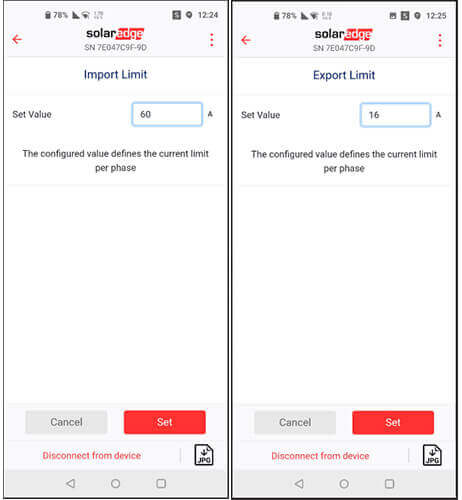
- On Commercial sites, the Maximal Import Limit (MIL) is equal to 60A and the Maximum Export Limit (MEL) is equal to 16A
- Installers will be able to modify these default values using SetApp.
Operating in Restricted Mode
EREC G100 Issue 2 defines two levels of operation in restricted modes.
The first level (state 3) is caused due to multiple breaches of the limitations for more than 15 seconds or an excursion longer than 1 minute.
The second level (AKA Locked out mode) is caused by multiple entries into state 3.
Setting the system to Normal operation mode
If the system is in Restricted mode, installers can use SetApp to set the system back to Normal mode.
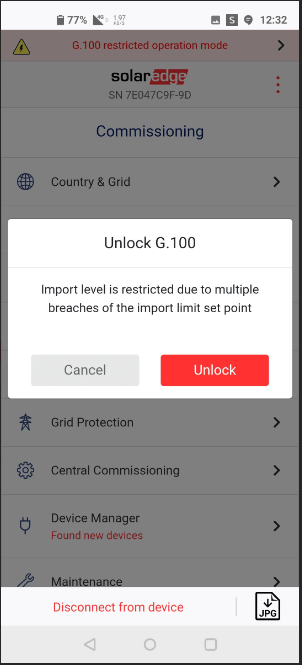
Note: In Commercial sites, installers will not be able to set the system back to Normal operational mode within four hours of the start of state 3.
Additional Features
| Feature | Description |
|---|---|
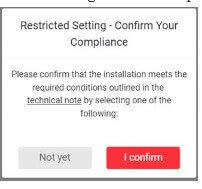
Added the String Toggle feature to SE33.3K/66.6K/100K inverters in Europe. Users must confirm that they comply with the conditions which allow them to use 850Vdc. | String Toggle Feature | Added a pop-up message when selecting 850V in Europe.
|
UK Country Table Updates
Added G100 support.
Firmware Version: 4.18.514
Release Date: April 2023
This release supports Three Phase Commercial Inverters and Three Phase Commercial Inverters with Synergy Technology.
Released Firmware Version
| Products | CPU | DSP1 | DSP2 | Additional |
|---|---|---|---|---|
| Three Phase Commercial Inverter | 4.18.514 | 1.13.2115 | 2.19.1700 | |
| Three Phase Commercial Inverter with PNs SExxK-xxxxIxxxx | 4.18.514 | 1.20.1518 | 2.20.1200 | |
| Three Phase Commercial Inverter with Synergy Technology | 4.18.514 | 1.13.2115 | 2.19.1700 | |
| Three Phase Commercial Inverter with Synergy Technology: PNs SExxK-xxxxIxxxx | 4.18.514 | 1.20.1518 | 2.20.1200 | Synergy Manager: 0.3.7 / 1.0.8 |
New Features and Enhancements
- Updated Japan Grid Codes for the new 25kW Commercial Three Phase Inverters: SE25K-JPI3IBNM4, SE25K-JPI6IBNM4
- South Africa Grid Codes Frequency Start Parameter was modified to comply with grid code requirements, to avoid issues during commissioning or after a grid event
- Lithuanian grid protection settings are now supported
- Poland Grid Codes were updated
- Uruguay country code was updated to comply with new reconnection time regulations
- Tan phi change was implemented for all French Grid Codes in low voltage range (up to 500 kVA) to comply with new regulations
Known Issues and Limitations
- Regarding the central settings (Leader inverter with Follower inverters), in some cases the country, grid and power values are not updated in the Follower inverters
- Workaround: Try to configure the settings again
- There is an error in the power limit display for the Three Phase Inverters with Synergy Technology (up to 120kW) during slow ramp up after a single Synergy Unit trips
Firmware Version: 4.17.615
Release Date: January 2023
This release supports all SetApp-enabled Three Phase Commercial Inverters and Three Phase Commercial Inverters with Synergy Technology.
Released Firmware Version
| Products | CPU | DSP1 | DSP2 | Additional |
|---|---|---|---|---|
| Three Phase Commercial Inverter | 4.17.615 | 1.13.2018 | 2.19.1602 | |
| Three Phase Commercial Inverter with PNs SExxK-xxxxIxxxx | 4.17.615 | 1.20.1230 | 2.20.906 | |
| Three Phase Inverter with Synergy Technology | 4.17.615 | 1.13.2018 | 2.19.1602 | |
| Three Phase Inverter with Synergy Technology (up to 120kW) with PNs SExxK-xxxxIxxxx | 4.17.615 | 1.20.1230 | 2.20.906 | Synergy Manager: 0.3.7 / 1.0.8 |
New Features and Enhancements
- Firmware upgrades during site visits is now optional for inverters that were already commissioned and not connected to an Energy Meter.
- After connecting to the inverter using SetApp, if a new firmware version is available you may decide to delay the upgrade to a later time by tapping Skip Upgrade
- Note: SolarEdge recommends upgrading inverter firmware whenever a new version is released
- The SolarEdge Sense Connect feature is now supported on Three Phase Commercial Inverters and Three Phase Inverters with Synergy Technology, with DSP1 1.20.xxxx and DSP2 2.20.xxxx
- Sense Connect enhances system safety through early detection and prevention of potential electric arcs at the connector level due to improper connections or possible malfunctions resulting from wear and tear
- For ROW (i.e. all regions outside of Europe and North America), the ability to toggle the inverter fixed string voltage between 750V and 850V is now supported via SetApp for the SE33.3K, SE66.6K and SE100K commercial inverters
- Enables improved design flexibility with fewer strings, less cables/fuses and reduced BoS costs
- Relevant for installations connected to the S1200 Commercial Power Optimizer, and only for specific inverter part numbers
- Read this App Note to learn how to toggle the inverter fixed string voltage
- For European countries, the FCR-D-Down capability was added for Three Phase Commercial Inverters with SE DSP. Controlled and managed by Grid Services.
Known Issues and Limitations
- Three Phase Inverters with Synergy Technology (up to 120kW): Resetting the inverter during the Pre-Commissioning stage will shut down the system if the inverter is solar powered and a power bank is not connected
- Workaround: If a reset is required, reconnect the power bank before resetting