Monitoring Your Solar Performance: The Role of PV Inverters in Tracking Energy Production

Table of contents
- Introduction
- The Brain Behind the Panels: What PV Inverters Actually Do
- Decoding the Data: Key Performance Metrics Your Inverter Provides
- Accessing Your Solar Insights: Monitoring Interfaces and Accessibility
- Understanding Your Energy Flow: Production vs. Consumption
- Maximizing Efficiency and Identifying Issues Through Monitoring
- Tracking Trends and History: Analyzing Your Solar Data Over Time
- Advanced Monitoring Features and Integration
- The Inverter's Role in Savings and Incentives
- Conclusion
Introduction
Your residential solar investment is a complex, high-performance system. Your PV inverter acts as the central intelligence, keeping things running smoothly with solar performance monitoring.
Observing and monitoring your solar inverter’s performance helps you maximize the advantages of clean energy. By tracking energy production, you can boost efficiency, savings, and utility incentive opportunities.
Let’s look at how PV inverters track energy production and the insights homeowners gain from being in the know.
The Brain Behind the Panels: What PV Inverters Actually Do
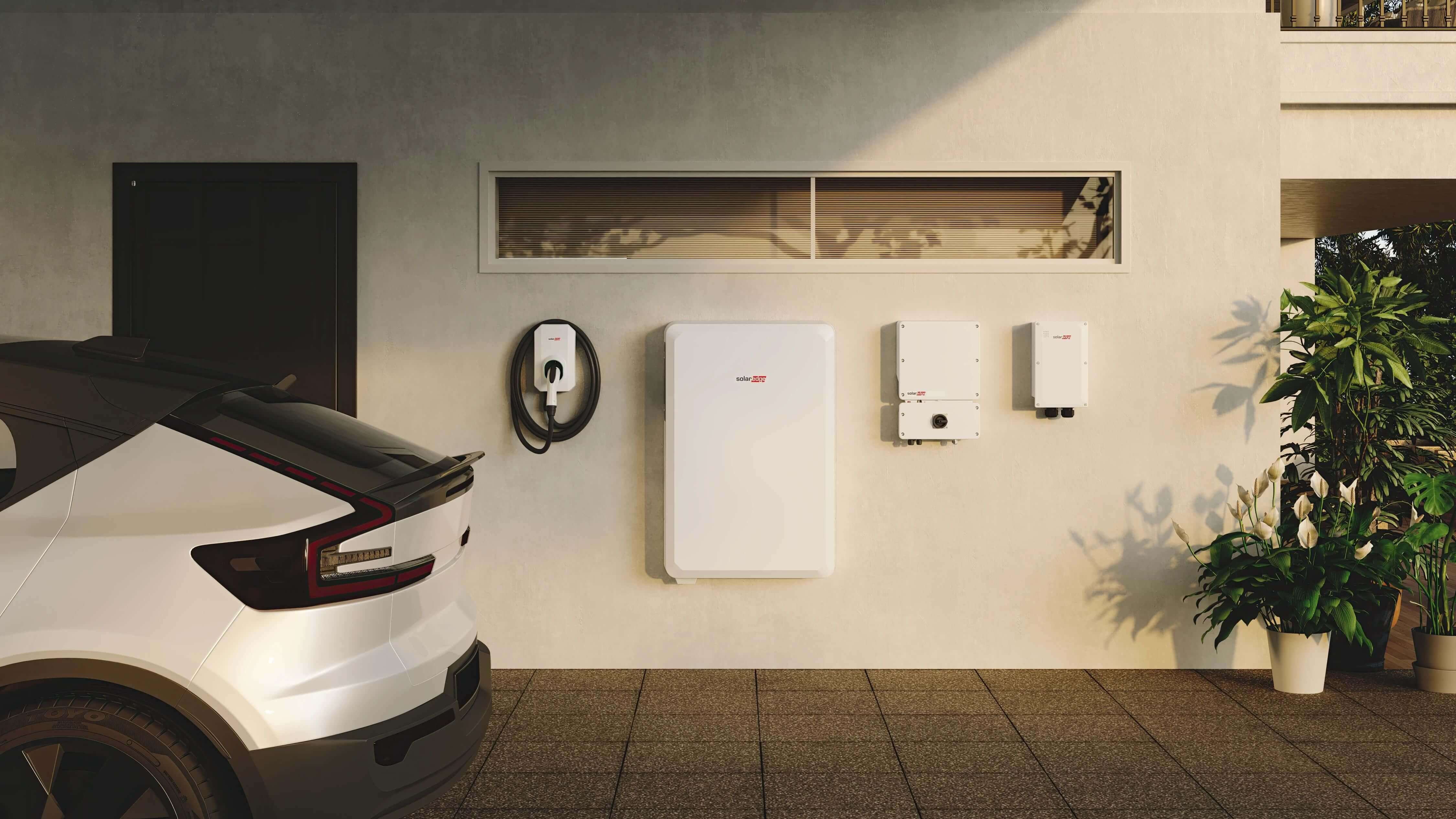
PV inverters perform two critical jobs: DC to AC conversion and system monitoring. Here’s how those break down:
1. DC to AC Conversion Makes Energy Usable
Your PV panels use sunlight to generate DC (direct current) electricity. But there’s a mismatch problem: your home’s major appliances and outlets require electricity from an AC (alternating current) supply.
Your PV inverter’s first job is to solve the mismatch by continuously converting DC to AC.
2. System Monitoring Enables Optimal Performance
Next, residential energy must meet stringent reliability standards enforced at the state and federal levels. Following these rules lets your system keep your home safely grid-connected while using the sun to power major appliances, outlets, medical devices, and other essentials.
Learn about SolarEdge’s compliance, standards, and certifications here.
The problem is that consistency doesn’t happen automatically: weather, time, usage, and other factors all affect power delivery.
Your PV inverter’s second job is to record system and production data. By reporting data to a monitoring platform, your inverter helps connect the dots, ensuring your solar system is performing optimally.
Your inverter is capable of pulling data from a range of sources, including PV panel output, grid voltage, power quality, and production and consumption metering.
The monitoring platform aggregates weather, inverter, and other data, generating an ongoing record of system performance. You and your installer can use this history to recognize performance and efficiency trends as well as identify events potentially affecting production.
Decoding the Data: Key Performance Metrics Your Inverter Provides
A PV inverter collects extensive data to tell the story of a home's solar energy production, including:
- Real-time power output (kW): This figure explains how much power your solar system is currently creating. It’s an instantaneous energy generation snapshot that updates to follow your system’s activity.
- Daily/cumulative energy production (kWh): Cumulative energy production data tells you how much total energy you’ve generated over a given period, reflecting your investment’s evolving impact.
- System voltage (V) and current (A): Voltage and current are general indicators of system health and generating performance. Both are important because variations in either can provide your installer with essential diagnostic information. Voltage and current monitoring also further safety by ensuring system components are operating within acceptable standards.
- System efficiency (%): Efficiency at the inverter is typically calculated as AC power output divided by DC power input. This measures how well the system is converting sunlight to electricity, and it’s a helpful performance benchmark. For instance, you might observe a jump in efficiency after upgrading to a new inverter or having your installer complete a routine service call. According to Penn State’s Department of Energy and Mineral Engineering, high-quality inverters typically exhibit 90-95% efficiency ratings. Inverters like the Home Hub can top weighted efficiencies of 99%.
- Grid connection status and net consumption: Your system may tell you whether it’s connected to the grid and how your home has been importing or exporting energy over time. These are handy stats to have on hand when you’re trying to save energy or earn utility bill credits.
Your inverter interface might include additional metrics. For instance, SolarEdge Monitoring displays peak (maximum) and weighted efficiencies, lifetime performance stats, and how much you’ve saved in CO2 emissions.
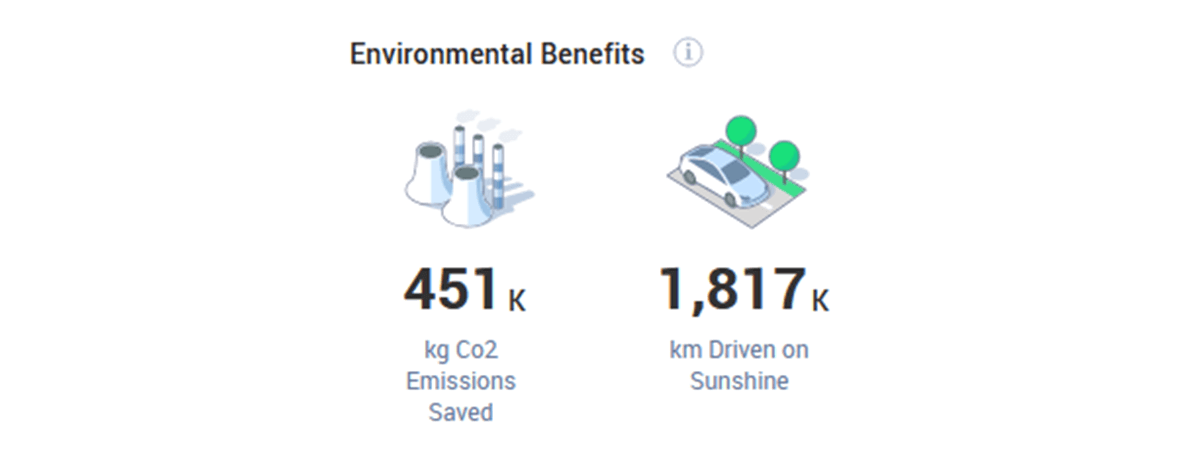
Use SolarEdge Monitoring to see your system’s environmental impact.
Take time to explore the indicators your inverter lets you access. Getting to know your dashboard or monitoring app can help you feel more comfortable making adjustments, managing upkeep, choosing cost-effective upgrades, and staying updated on long-term performance.
Accessing Your Solar Insights: Monitoring Interfaces and Accessibility
Modern inverters offer multiple ways to check your performance data. Today’s systems often include remote access features, letting you get mobile or online insights when you’re on the go.
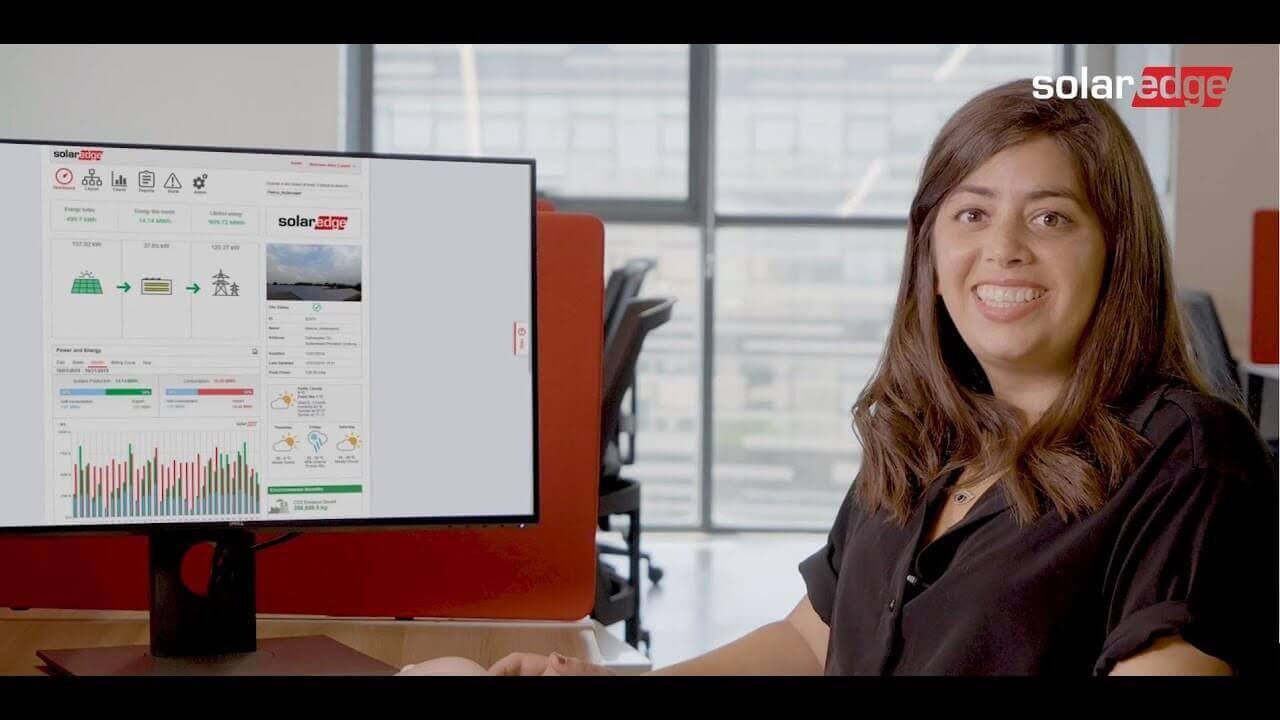
The SolarEdge monitoring platform gives you a complete overview of your home’s system from your mobile devices using mySolarEdge or the web Monitoring dashboard. These tools show you where your energy is going, how your system has been performing over time, and how much you’re saving. You can also adjust your favorite settings or check out environmental factors, alerts, reports, and energy flows.

The SolarEdge monitoring platform reveals your home's PV production and consumption, helping you visualize real-time power flows and data.
On-the-go data access is more than just convenient. It helps you stay connected to critical data, increasing your odds of noticing potential problems before they become costly.
Real-time visibility and alerts are essential to stopping issues in their tracks instead of looking for answers at the last minute. For example, up-to-date warnings help you plan system service before events like storms and outages.
What are some things you should look for in a monitoring interface? Here are a few suggestions:
- Easy report generation: Convenient power and energy report downloads (such as CSVs and PDF charts) let you explore information at your own pace.
- At-a-glance lifecycle information: Don’t forget about general status info, like installation dates, battery status, and peak power. These are all crucial data points to share with your installer or service team at maintenance time.
- Streamlined navigation: Residential solar installations generate a lot of information. Invest in a system that takes the work out of exploring the data.
- Comparative production: You should be able to compare your current and past performance visually to easily spot long-term changes.
Where do performance insights come from? Your PV inverter’s data logger continuously samples system parameters in the background, collecting records in an onsite digital database. The logger then formats this information, analyzes it, and securely uploads it to a remote server in batches so that you can access insights online, via mobile, or locally.
Data logging is essential for any PV system. This is easiest to appreciate when you think about larger multi-inverter setups.
Homeowners with more than one inverter have to deal with multiple data sources from each system, including from different PV panel arrays. A reliable, dedicated logger helps keep all that information organized, allowing the homeowner to draw more accurate conclusions. PV inverters with built-in monitoring can help you make sense of the numbers you’re seeing, especially when it comes to visualizing what different energy flows mean.
Understanding Your Energy Flow:
Production vs. Consumption
Energy flow dashboards show how much energy your home consumes compared to how much it’s generating. This comparison may help you develop better habits about storing and using energy at the most profitable times, which is essential under utility schemes like Net Energy Metering (NEM).
Remember: Not all PV inverters come with built-in consumption metering. In some cases, it’s necessary to add extra hardware, which may make your installations more complicated. Upgrading these systems might also be more labor-intensive if your current consumption metering isn’t compatible with your new equipment.
A simple way to think about net energy usage is that it represents when you’re generating a surplus or consuming more than what you generate. Homeowners who understand this distinction can practice energy usage routines that maximize their solar return on investment.
When equipped with meter and current transformers, your PV inverter is capable of measuring production, household power consumption, and import and export to the grid. Viewing this flow of electricity from the monitoring platform can help solar system owners better grasp their energy usage.
Maximizing Efficiency and Identifying Issues Through Monitoring
An inverter helps homeowners understand their investment’s overall efficiency by boosting their situational awareness. The ability to check performance at any given moment gives you a better feel for what’s normal and when to call for help with your system.
Your production data dashboard offers a one-stop clue into long-term trends. When you’re expecting a certain level of return, production information can offer unmatched insight into whether you’re achieving your goals.
As your investment matures, thorough upkeep also becomes increasingly crucial to getting the maximum possible efficiency and savings. The good news is that your inverter can help.
Modern inverters alert homeowners in advance of serious issues. After detecting potential problems or drops in energy production, your system may show you:
- Fault codes: These codes usually appear as a combination of letters and numbers, with each code indicating a specific category of issue. As a homeowner, you won’t see fault codes, but your installer can access them using diagnostic tools.
- Error messages: Error messages go into a bit more detail than fault codes, often telling you (or your installer) what to do next to fix the problem.
- Performance alerts: Performance alerts are usually sent to your mobile device or displayed on your monitoring app dashboard. They tell you about big-picture efficiency changes, remind you of needed maintenance actions, and let you track custom performance benchmarks.
Although you can’t read fault codes yourself, your inverter may indicate them in other ways. For instance, some Home Hub Inverter models include a series of LEDs for quick diagnostics. To learn what they mean, check out our guide.
Fault LEDs, error messages, and performance alerts are all important home solar health indicators. Pay attention to these diagnostic tools. By using your dashboard to perform regular checkups, you’ll detect issues sooner, which is key to increased system longevity and savings.
Tracking Trends and History: Analyzing Your Solar Data Over Time
Not all inverters save data in the same way. The Home Hub Inverter focuses heavily on usability and safety, storing production and optimization measurements along with diagnostics and other information.
In the event that communications are lost, a SolarEdge inverter can typically retain around 3 weeks’ worth of production data. When your connection is restored, the inverter will send the stored information to the monitoring platform, helping avoid gaps in your production data.
Information sent to the monitoring platform is retained for the lifetime of your system so that you can view seasonal variations in production and performance changes over time. For instance, you might notice a difference after adding data-producing devices, such as EV chargers and other smart home systems. To export or download your data, you can use the SolarEdge Monitoring app.
With remote data storage, comparative monitoring can help homeowners compare their current and past solar production. This makes it easy to see seasonal variations and performance changes.
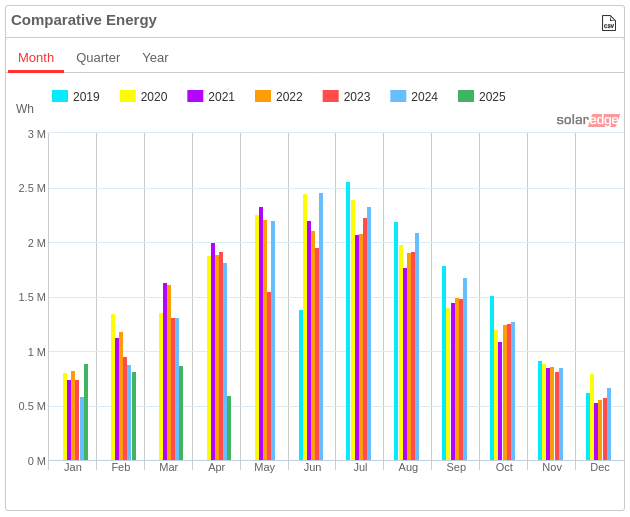
SolarEdge Monitoring lets you compare energy trends from different timeframes side-by-side.
Advanced Monitoring Features and Integration
SolarEdge Monitoring lets you work with your installer to set up custom alerts based on performance thresholds you choose. For example, you can pick whether to trigger alerts based on efficiency, production, consumption, and other measurements.
Connecting your PV Inverter with your smart home’s other energy management systems has a major benefit. It helps you adopt a more holistic energy outlook.
Looking at the bigger picture is smart. Broadening your perspective lets you budget power and minimize your energy footprint more effectively. It also has the helpful side effect of letting you save on utility bills by choosing optimal times to use different home loads.
The Inverter's Role in Savings and Incentives
Your PV inverter’s monitoring dashboard can make it easier to calculate energy savings. For instance, SolarEdge Monitoring puts things in simple terms, showing clear dollar values and connecting you to comparative historical production/consumption data for financial analysis.
States and the federal government have spent decades championing cleaner, more resilient domestic energy. As a result, US homeowners have multiple opportunities to benefit from solar incentives and rebates. These arrangements take multiple forms, including utility bill credit programs, digital gift cards, and cash disbursements for participating households.
Many credit programs require you to share production data with the utility company to remain eligible. This is commonplace in arrangements that reward you for sharing energy with the grid or conserving during high-demand periods.
In addition to helping you understand your personal savings history, your PV inverter may help you qualify for incentives. By providing secure access to your system’s performance data, monitoring helps your utility confirm that your home meets the requirements for participation.
Conclusion
PV inverter monitoring isn’t just for DIY solar enthusiasts. All US homeowners with solar stand to benefit from being well-informed.
In our evolving energy market, understanding your performance data translates to keeping your system optimized. Monitoring increases the peace of mind that comes with being a solar owner by offering first-hand information. You don’t have to wait for a service call to know if your system’s delivering optimal savings.
Not sure where to start deciphering your system data? Reach out with your contact information. We're always happy to help homeowners get the most out of their PV inverters and monitoring, so find an installer.
FAQs
What happens to my solar production data if the internet goes out?
The SolarEdge Home Hub inverter will retain around 3 weeks of data in memory if disconnected from the grid. The amount of data will vary depending on the types of equipment installed on site, and older data will be replaced with newer data once memory is full.
After your connection to the monitoring platform is restored, the inverter will backfill any data stored in its local memory, uploading it to the remote platform and resuming normal operation.
SolarEdge Home Hub inverter communication options include Ethernet, Wi-Fi, Cellular, and RS485 for inverter-to-inverter communications.
Are all inverter monitoring platforms the same?
No. Different platforms offer distinct feature ecosystems. Monitoring platforms also vary in terms of their overall goal, with some serving primarily as safety tools instead of full-on production performance trackers.
Can I integrate my solar production data with other smart home devices besides energy management systems?
With most systems, you control your data and how you use it. You may also have the freedom to add other smart home devices that produce extra data.
Some systems make smart home integration easier by connecting the dots in the background. For instance, AI personal assistants, like SolarEdge ONE, can use monitoring data to generate an energy plan according to your goals, utility rates, and more.
Will monitoring my solar performance help with warranty claims?
Monitoring your solar performance provides you with additional data that may help the claims process go more smoothly. Compared to describing your issue to a support agent, providing performance data may result in faster resolution and promote claim approvals.
How often should I check my solar monitoring system?
This varies, but you can view your solar monitoring system whenever you want to.
Some homeowners check in on their systems every few hours. Others only look at their production every few days.
No matter how often you check, remember:
- Timing affects production. Try to check your system at a consistent time of day.
- If your area experiences seasonal weather, watch the forecasts. Check production, stored energy levels, and usage trends more regularly before events like hurricanes and tornadoes.
- Check your consumption rate more often before using EV chargers and certain appliances to find the ideal time to power these larger loads.
- After maintenance, pay close attention to your system data to ensure that any problems have been corrected.
Can I give my solar installer access to my monitoring data?
In most cases, your installer will be the person setting up your monitoring site and providing you with access, so they’ll already have access. If you’re working with a new installer or setting up a home with existing solar monitoring, please use the following form to request an access transfer from SolarEdge Support: Request for Monitoring Site Transfer and New User Access.
Your installer can also help set up access to the SolarEdge API to integrate your production data with third-party systems. Like any API (application programming interface), this feature requires coding knowledge. Please review the supported features on both the SolarEdge API application note and your third-party product documentation.
If I add more solar panels to my system, will my existing inverter monitoring system still work?
Yes. After adding solar panels to your system, your installer can add the new panels to the physical layout of your monitoring site so you can view their performance. Typically, this happens a few days after the new panels are installed, but the timetable may vary depending on your installer.
Always consult your installer and utility prior to adding solar panels to your system, as doing so may change your utility interconnection agreement.
Are there any privacy concerns associated with monitoring my solar data?
Privacy is an important concern when handling any data. SolarEdge systems protect your information by adhering to the latest in applicable security standards and using established best practices, such as encrypting transmitted data.
Our software engineering teams monitor vulnerabilities and CVEs while continuously updating our products to minimize your cybersecurity threat profile. As a result, SolarEdge products have earned regulatory approvals from several national agencies, including those in the US, Canada, and Australia.
Learn more about SolarEdge standards and certifications here.